Media Hub: Removal
- Disconnect and isolate the negative battery cable. If equipped with an Intelligent Battery Sensor (IBS), disconnect the IBS connector first before disconnecting the negative battery cable.NOTE:
Be certain to take the proper precautions to prevent the floor console from receiving cosmetic damage during the following procedures.
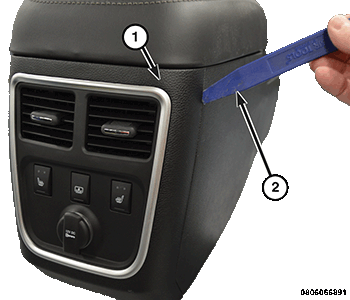
- Using a C-4755 trim tool or equivalent (2), remove the console end cap (1).
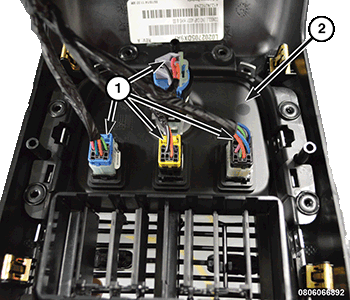
- Disconnect the four wire harness connectors (1) from the switch/power outlet panel (2).NOTE:
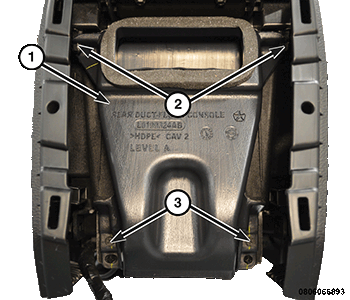
The floor console rear duct (1) is aligned and held in position by the locating pins (2) which assist in assembly.
- Remove the two screws (3) from the floor console rear duct (1) and remove the duct from the console.
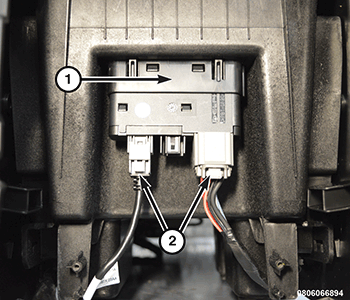
- Disconnect the console wire harness connectors (2) from the media hub (1).
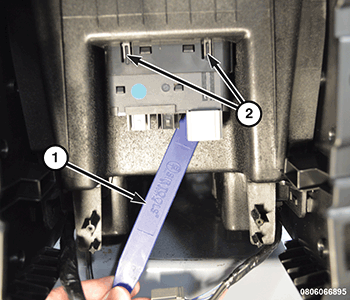
- Using a C-4755 trim tool or equivalent, compress each of the latch tabs integral to the media hub housing while pushing the housing up through the mounting hole in the floor console storage bin.
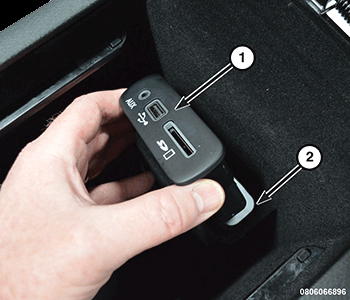
- Carefully remove the media hub (1) through the floor console storage bin opening (2).